
Pinpoint an exact spot.
To get the Latitude and Longitude from Bing maps you should centre the map on your point of interest, then do either of the following:
- Type javascript:map.GetCenter() in the address bar of IE and then hit ENTER. Your map will change to a page containing the Latitude and Longitude.
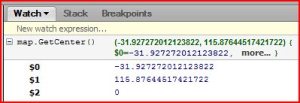
- In Firefox, using Firebug go to the Script tab and the in the right hand (Watch) pane enter javascript:map.GetCenter() into the New Expression field and hit ENTER. (see below)
 GP23 Consulting