
You can create connections to Dynamics 365 (CRM 2016 etc) without using the LINQPad CRM Driver.
- Create a new query
- Select Query | References and Properties from the menu (F4)
- Add the following references to the Query Properties
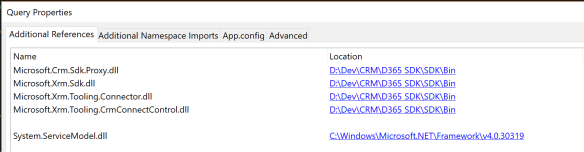
- If you have an assembly with Early Bound entities you can also add it here.
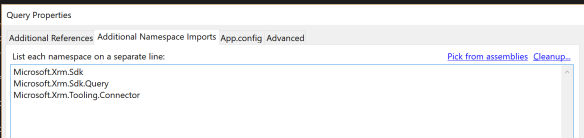
- Open the Additional Namespace Imports tab and select the following namespaces. Include any Early Bound entity namespaces here too.
- Enter the following code into LINQPad to make your connection and generate your queries.
- The Util.GetPassword is the LINQPad utility method for retrieving a password encrypted in the LINQPad Password Manager.
void Main()
{
 string url = "https://mycompany.crm6.dynamics.com";
 string username = "mycompany.user@mycompany.onmicrosoft.com";
 string password = Util.GetPassword("d365-crmadmin");

 CrmServiceClient conn = new CrmServiceClient($"Url={url};Username={username};Password={password}; AuthType=Office365");

conn.OrganizationServiceProxy.Timeout = new System.TimeSpan(0, 3, 0);

 conn.OrganizationServiceProxy.EnableProxyTypes();

 IOrganizationService orgService = conn.OrganizationWebProxyClient != null ? (IOrganizationService)conn.OrganizationWebProxyClient : (IOrganizationService)conn.OrganizationServiceProxy;

Context = new XrmServiceContext(orgService);

// Write your queries as normal
 // var myQuery = from a in Context.AccountSet where ....
}

public XrmServiceContext Context { get; set; }
 GP23 Consulting