Author Archives: Alistair Hunt
Using different Endpoints in a WCF Service
IE Silverlight vanishing trick!
I had just configured the VS 2008 development environment on a machine I dont normally use to use the November 2009 version of the Silverlight Toolkit. Having created a new C# Silverlight Navigation Application and put together some basic code I hit F5 and waited for my RIA to fire up so that I could debug it. What I was presented with was dialog box with the error message – ‘Unable to start debugging. Cannot locate Microsoft Internet Explorer.‘
I hadn’t changed any of my browers settings so I made sure that IE was set as the default browser, I checked that I could open up IE and do some general surfing and I even made sure that the Browse With… worked from within VS. Everything was OK except my ability to run from F5. A few minutes of research pointed me to a (translated) page which highlighted the problem and potential solution.
Navigating to HKEY_LOCAL_MACHINE\SOFTWARE\Microsoft\Windows\CurrentVersion\App Paths I found that the iexplore.exe key was missing. So here’s what I did:
- Added the iexplore.exe key to the registry.
- Changed the (Default) REG_SZ value to C:\Program Files\Internet Explorer\iexplore.exe
- Added a new REG_SZ value called Path and set it to C:\Program Files\Internet Explorer
- Restarted my Visual Studio.
After making these changes, opening my project and hitting F5 it was working again. I have no idea what caused the Key to be removed in the first place but I can only think it was the Silverlight Toolkit installation process that did it???
The virtual path ‘/App_Resources/dev/mycontrol.ascx’ maps to another application which is not allowed
I had been trying to set up a development environment for Visual Studio so that instead of using the in-built Development Server (Cassini) I could use IIS. Since I had to develop on a Windows XP machine my first problem is that I could not create more that one Web Site under IIS 5.1 so I had to resort to using Virtual Directories for the applications (A Web app and a WCF app). This differed from the live setup where each was configured under its own web site and this is where my problems started. When I fired up the web application I was greeted with this error – The virtual path ‘/App_Resources/dev/mycontrol.ascx’ maps to another application which is not allowed.
The web application used the concept of loading controls from embedded resources using the LoadControl() method and this was causing the error. In the live environment the application is always at the root for the website because of the deployment configuration, however in my scenario the web app was located in a virtual directory off the root web site. The issue occurs because the virtual path ‘/App_Resources/’ assumes that it is at the web site root rather than the application root. To solve the problem I just need to add a tilde (~) to the front of the virtual path in the managed code so it became ‘~/App_Resources/dev/mycontrol.ascx’. I also found instance in the JavaScript code where this situation occurred but this time we just need to use the dot notation to indicate the root folder. The virtual path in the script became ‘./App_Resources/dev/mycontrol.ascx’
For information on loading webforms and usercontrols from embedded resources take a look at http://www.codeproject.com/KB/aspnet/ASP2UserControlLibrary.aspx
Skype interfering with IIS
I have been working at a client who is using Windows XP on their development boxes and came across this issue the other day when I tried to start IIS – Unexpected error 0x8ffe2740 occurred. I had a look in the System Event log and found an Error for the W3SVC service – The service could not bind instance 1. I like to have a quick look at http://www.eventid.net in these situations as the Event ID (115) will usually have an explanation for what caused the error along with some helpful responses from people who have had the same issue.
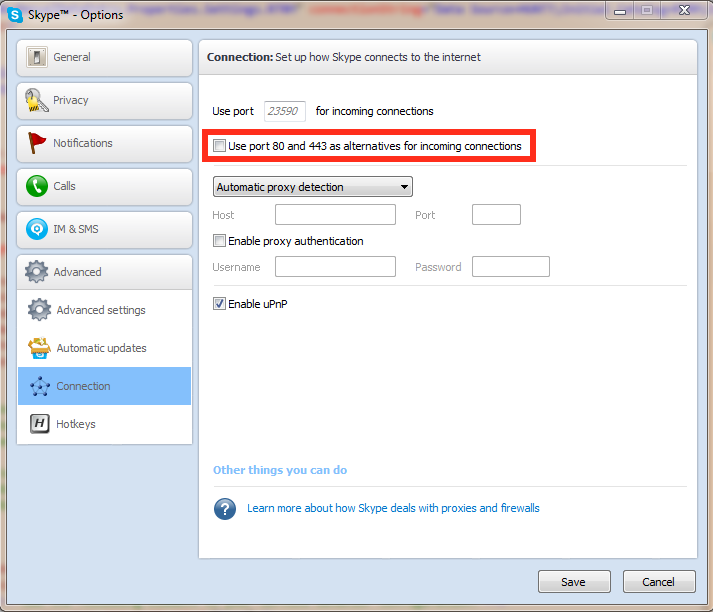
My first clue pointed me to this article about the problem which suggested that another service/application was already using port 80. Doing a bit more searching I came across another blog which provided me with a better solution… Skype was getting in the way! Since Skype will use port 80, if its free, it was stopping IIS from using the port. Fortunately this is an option in Skype you can turn off. Just deselect the check box (highlighted below) and then restart IIS.
UPDATE : I have also encountered this issue on a Windows 7 machine I was using for development which was highlighted by this article. The fix to the problem was the same as detailed above.
EntLibConfig.exe
If you use Microsoft’s Enterprise Libraries at all then you may have seen this tool before…
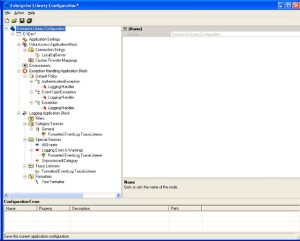
I found this tool while doing some research on the Enterprise Library entries in an app.config file and realised it could be very useful for the application I was working on. My problem came when I tried loading the app.config file into the EntLibConfig.exe as it reported that one or more errors had occurred during the loading process. The errors I were getting appeared as "…The located assembly’s manifest definition does not match the assembly reference." at the bottom of the screen. The app.config file was valid as my application had been running without any issues.
My search for an answer took me to this page – http://blogs.msdn.com/tomholl/archive/2007/04/19/avoiding-configuration-pitfalls-with-incompatible-copies-of-enterprise-library.aspx – which explained that I was trying to load an app.config file referencing assemblies that were not signed. Taking a look at my entries in the app.config file for the Microsoft.Practices.EnterpriseLibrary I found that all the PublicKeyToken values were null. Since the EntLibConfig.exe was using signed assemblies this was the reason for the errors.
My next task was to find out what the Public Key Token value was for the Enterprise Library assemblies. For that I used the Strong Name Utility (sn.exe). This link gave me some useful information about using SN.exe – http://blogs.msdn.com/miah/archive/2008/02/19/visual-studio-tip-get-public-key-token-for-a-stong-named-assembly.aspx
Having entered the correct Public Key Token values into the app.config my configuration file now loaded into the EntLibConfig.exe without any errors and I was able to do the necessary editing.
ForeignKeyReferenceAlreadyHasValueException
Table A has a Foreign Key (integer) field that is referencing a Primary Key (integer) field in Table B. I wanted to be able to set the value of the integer in Table A to a new value using my entity object property for Table A. When I tried to set the value of the integer field I got a ForeignKeyReferenceAlreadyHasValueException and the message ‘Operation is not valid due to the current state of the object.’
The solution is not to try and set the integer value of the field but define the value for the whole entity. For example;
// Dont assign just the ID value
EntityName.ForeignKeyFieldID = myIntegerValue;
// Assign the entity
EntityName.ForeignKeyField = myEntity;
MSBuild Error 5004
During an automated build process I came across an error that MSBuild had thrown – ‘Error parsing the nested project section in solution file’. The problem stems from a change to a GUID for one of the Nested Projects within the Solution File. When comparing a Solution File for a successful build to the failed build I found the GUID had changed. To rectify the error I added a blank text file to the solution, saved the changes to the solution file, removed the text file and re-saved the solution file. This resolved the issues as the next build was successful.
GAC & ZAP
The GAC holds assemblies installed on the local host that are available for shared use by other code. The Zap Cache is a sub-cache of the GAC that holds assemblies that have been precompiled into native machine code. Zap Cache assemblies are typically Fully Trusted libraries that are used frequently by the CLR itself, so precompilation boosts performance.
If you would like to know more, take a look at http://www.nsa.gov/ia/_files/app/oldFiles/NET_Framework_Sec1.pdf
Unable to find manifest certificate in the certificate store
<manifestkeyfile>…</manifestkeyfile>
<generatemanifests>…</generatemanifests>
<signmanifests>…</signmanifests>