Outlook.com – Hotmail goes Metro!
Reply

When you create a simple .Net 4 WCF Service Application it generates a simplified web.config file with default endpoints. This is great when you need a simple service and don’t want a cluttered config file. However, I did come across a small issue with the default file when you try to open it with the Service Configuration Editor. When you try to open the file an error is displayed; ‘The ‘name’ configuration element key cannot be null’. To fix the problem just add the name attribute to the behavior node;
<behaviors>
    <serviceBehaviors>
        <behavior name="defaultBehaviour">
            <serviceMetadata httpGetEnabled="true" />
        </behavior>
    </serviceBehaviors>
 </behaviors>
Ever wondered what CRM would like on an iPad? Your wait may soon be over …
Posted from my Windows 8 VM 🙂
As with all things technological the CRM Email Router I have been working with got upset when our Exchange Server was upgraded from 2007 to 2010. After making the required changes to the Incoming Configuration for the new Exchange server I went to check the configuration using the Test Access option in the Configuration Manager. I ended up with this error;
Which pointed me to this KB article about the problem. I could see the problem if I navigated to the Exchange web service listed in my Incoming Configuration – https://<my.exchange.server>/EWS/exchange.asmx – as I was presented with an Invalid Certificate notification.
The change in Exchange Server meant a new Certificate was issued for the new server and this needed to be installed on my CRM Email Router machine, making sure it was added to the Trusted Root Certification Authorities section. Since the certificate cannot be validated by Windows you do get a security warning, but since I know it comes from valid authority (the Exchange Server) I can install it and everything is back to normal.
Having installed the CRM 2011 Email Router on the server and configured the Incoming and Outgoing server options when I came to ‘Test Access’ I got the following error in both test results:
Incoming Status: Failure - Type 'System.ServiceModel.Channels.ReceivedFault' in Assembly
'System.ServiceModel, Version=4.0.0.0, Culture=neutral, PublicKeyToken=b77a5c561934e089'
is not marked as serializable.
To solve this problem I had to do two things:
Once I had made these changes and restarted my CRM Email Router Service then the Test Access dialog indicated that both Incoming and Outgoing profiles had succeeded.
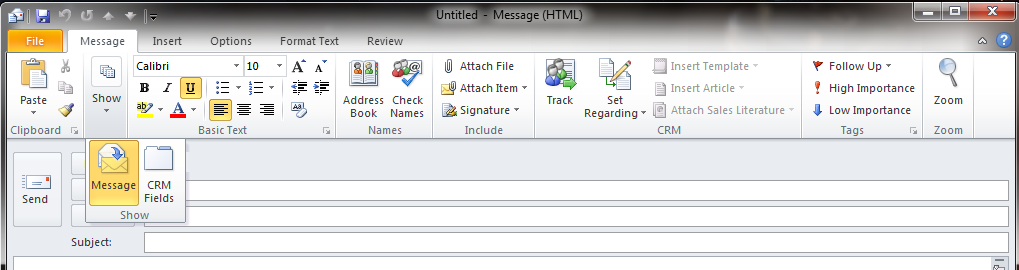
When you create an Activity within Microsoft CRM 2011 using the web client it appears as if you get additional fields in the Details section that are not available when using the Outlook 2010 client. For example, my users wanted to be able to populate the Duration field when they complete an email so they can report on time against a particular client, account and/or case.
Fortunately the fields in the Details section are available within the Outlook 2010 client for CRM 2011 you just have to know how to find them.


Don’t deploy the same assemblies twice …MEF DeploymentCatalog and Reference assemblies
 GP23 Consulting